

The “I accidentally reported you” scam
A stranger apologises for reporting your account, warns you that a ban is coming, and points you to the one support agent who can stop it. The whole thing is built to get you to hand your own account over, and the same pattern shows up well beyond Discord.
Summary
"I accidentally reported you" is one of the longest-running scams on gaming platforms. A stranger, or a friend whose account has been hacked, tells you they reported you by mistake, that you're about to be banned, and that only one particular support agent can sort it out. That agent is part of the scam, and what they're really after is your account, your money, or both.
It keeps working because it doesn't need to break into anything, since all it has to do is keep you panicking for a few minutes. That's also its weak spot, because real platforms don't run support through a stranger's DMs, and you can check your own account from inside the official app in under a minute. One of these landed in my DMs on 4 November 2026, so I'll use it as the example throughout.
1. How the scam works
Whichever platform it's on, it tends to follow the same four steps, which Bitdefender laid out for Discord earlier this year:
• Getting in. It starts with a friend request from a stranger, sometimes someone from a server you share, and sometimes after a long friendly chat. It can also come from someone you actually know, because these messages often come from hijacked accounts.
• The panic. They say they reported you by accident, that your account and IP address are going to be banned, and they usually have a screenshot of an "email" to prove it.
• The hand-off. Apparently only one person can fix this, and it's a "support" account that you need to add right now.
• The takeover. The fake agent then asks you to "verify" yourself, usually with a code sent to your email or a change to your account details, which is all they need to reset your password and lock you out. Some versions ask you to pay to make the report go away instead.
None of this is new, and it isn't only a Discord thing either. Malwarebytes wrote up the Steam version back in 2021, and it used the same "illegal purchases" accusation that I got five years later, so the script clearly hasn't needed much updating.
2. What it looks like in practice
In my case, a random account sent me a friend request, and three minutes after I accepted it, the opening line was that something terrible had happened and that he was here to help. I asked what had happened, and two hours later I got the full story. He had reported my account for "illegal purchases/scams" instead of someone else, I was going to be suspended and have my IP blocked, he'd lost $200 to someone with the same profile as mine, and could I please help him explain it all. A screenshot of an "email" came attached, and four minutes later he tried calling me as well.
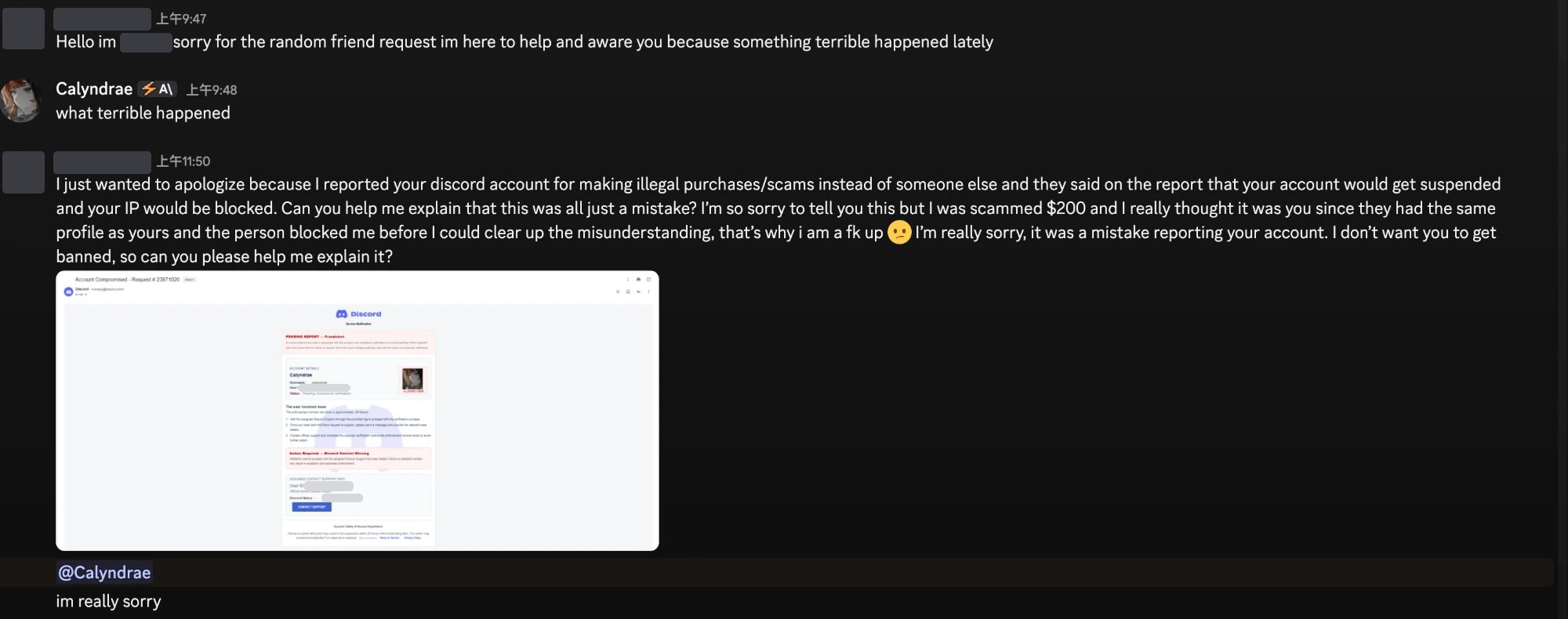
The fake email is the clever part. It shows my display name, my username and my avatar stamped "ALLEGED USER", along with a 24-hour "enforcement window" and an "assigned" agent described as an official Discord safety analyst. It feels personal and very official, but my name and avatar are sitting on my public profile, so it wouldn't take long to put together. Plus, it's only a picture of an email, which means it can say whatever the person making it wants it to say.
3. Why it works
It would be easy to say that only silly people fall for this, but I don't think that's fair, because the whole thing is built around how people normally react. As far as I can tell, it comes down to four things:
• The threat comes with an apology. Nobody is threatening you, because it's just a sorry stranger who made a mistake and also lost money, so it feels like you're helping someone rather than being pressured by them.
• There's a deadline. A 24-hour window gives you a reason to act first and check later, and checking is the one thing the scam can't survive.
• It borrows authority. The logo, the request number and the job title all do the work of making it look like a real process is already running.
• You make the first move. You're the one who adds the agent and sends the first message, so it feels like you contacted support, rather than a stranger contacting you.
Also, the fear itself is reasonable, because losing an account can mean losing years of friends, servers and purchases.
I couldn't find a public figure for this particular scam, but it belongs to a much bigger family that does get counted. The US Federal Trade Commission says people reported losing $3.5 billion to imposter scams in 2025, which is nearly three times the 2020 figure. Nearly one in three fraud reports were about imposters, more than any other category, and nearly $1 billion of those losses went to people pretending to be businesses. Those are US numbers and only count what people actually reported, but the FTC also notes that some of the costliest cases start with a fake security alert, often from a bank, and that's really the same scam wearing a different logo.
4. Where it falls apart
The story only holds together while you stay inside it, and it starts coming apart as soon as you look at anything the scammer doesn't control.
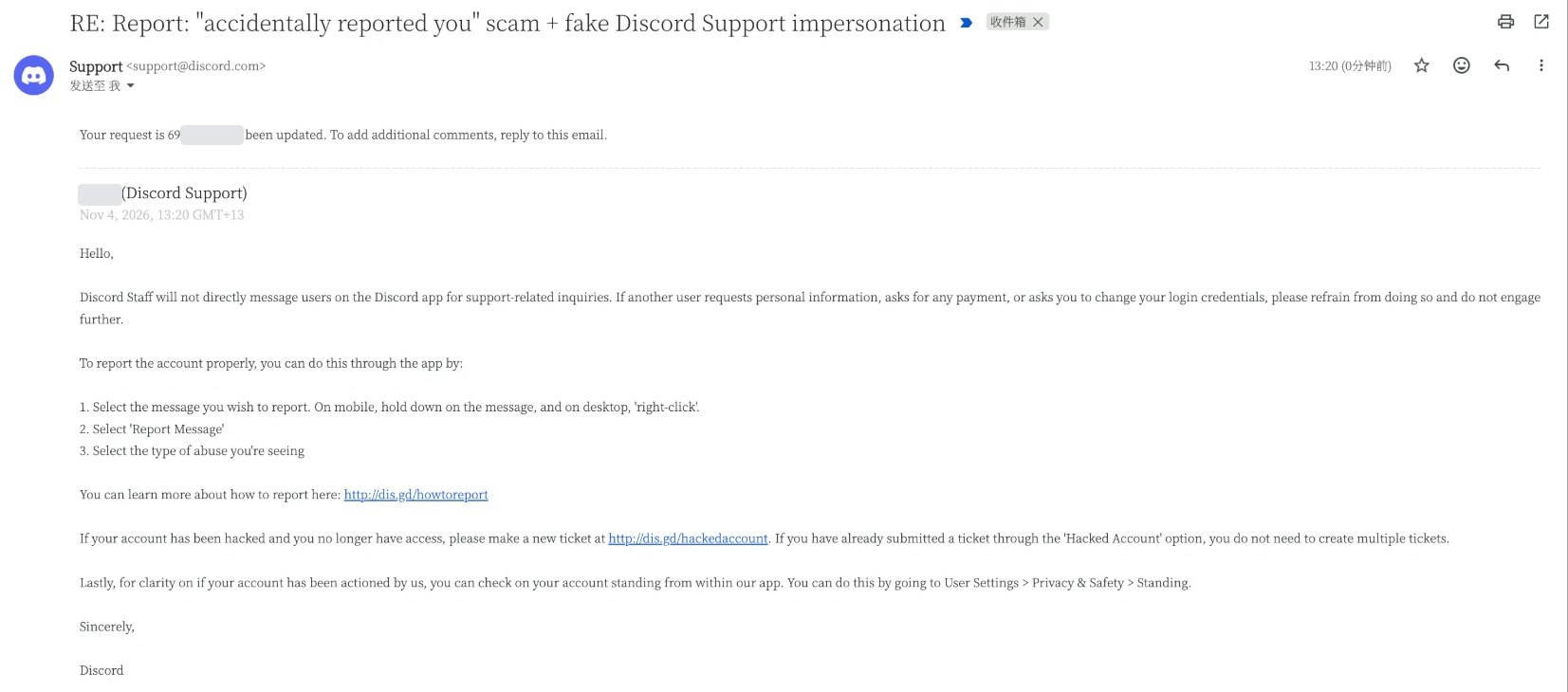
Support doesn't work this way, for a start. Discord's own help centre says staff "will never contact users directly through the Discord app for support-related matters", and when I reported all this by email, Discord Support told me the same thing five minutes later.
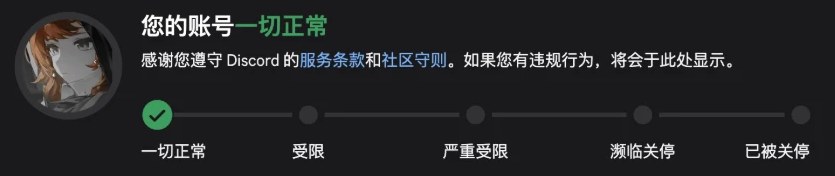
You can also just check. Discord shows your real status under User Settings > My Account > Standing, on a scale that runs from "All good" through to a permanent suspension. Mine was sitting at the very first step while my supposed 24-hour countdown was running.
Once you stop panicking, the email has plenty of holes of its own. The subject line says "Account Compromised" while the body talks about a fraud report, which are two completely different problems. As far as I can read at that low resolution, the User ID on it doesn't even match mine. And the whole "verification process" amounts to sending a friend request to some account, while the person in such a desperate hurry to save me took two hours to reply. Honestly, that last one made me laugh.
5. What to do if you get one
1. Don't add anyone, and don't share anything
That means no codes, no passwords, no account tokens and no payments, no matter how official the person sounds. Discord Support's own advice is that if another user asks for personal information, payment or a change to your login, you shouldn't do it and shouldn't engage any further.
2. Check your status yourself
Open the app or type the official address yourself, instead of following anything you were sent. This works far beyond Discord too, so a scary message from your "bank" gets the same treatment.
3. Report it through the proper route, then block
On Discord, right-click the message (or hold it down on mobile), choose Report Message and pick the type of abuse. I emailed support first and got pointed to the in-app report, so you can save yourself that step.
4. If it came from a friend, tell them another way
If someone you know suddenly sends you this, their account has quite possibly been taken over, so let them know somewhere other than that account.
5. Make the takeover harder in advance
Turn on two-factor authentication with an authenticator app and use a unique password. It's also worth protecting your main email properly, since the codes go there, which is something I went through in Takeover without prior intrusion.
6. If you've already handed something over
Don't be embarrassed, and move quickly. Change your password if you still can, warn your friends, and if you've been locked out, Discord's recovery form is at dis.gd/hackedaccount.
6. Conclusion
The whole scam depends on you believing two things, which are that something is about to happen to your account and that only this one person can stop it. Both of those can be checked from inside the app in less time than it takes to read the message, so you don't need to be able to spot every fake email, as long as your habit is to go and look for yourself.
As for mine, my account is still sitting on "All good", and the only account that has actually been reported here is his.